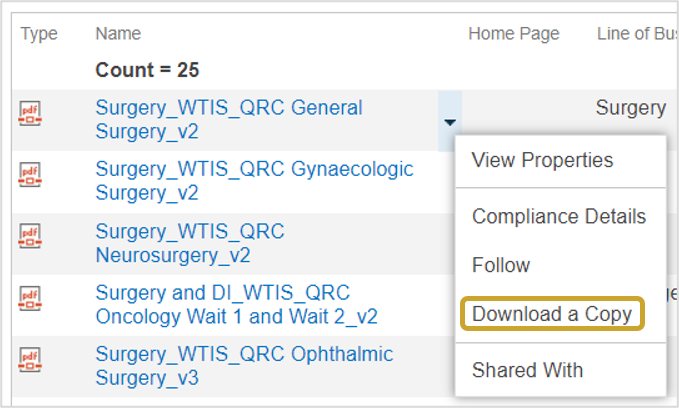
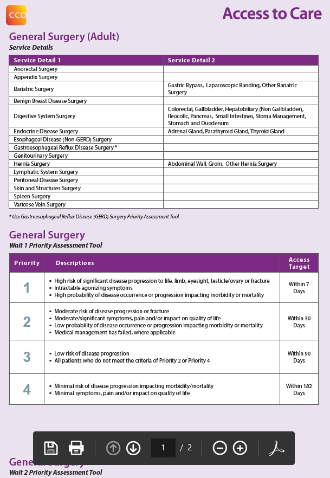
Downloading, Viewing or Printing a Priority Assessment Tool (PAT)
 |
Important: Do not use the Priority Assessment Tool link in the WTIS. The PATs should be accessed from the ATC Information SiteATC Information Site, they provide a comprehensive description of the Priority Level, wait time targets, Service Details and other information to assist with capturing wait list entries accurately. See steps below.
|
For additional details about Priority Levels (i.e. DARTs, DARCs, System Delay, etc.), refer to the following documents on the ATC Information SiteATC Information Site:
 |
Note: These tools are found on the ATC Information Site, access is limited to facility resources (i.e. WTIS coordinators, LRAs) supporting Ontario Health programs. To request access contact Ontario Health. |
To download, view or print a Priority Assessment Tool (PAT):
- Go to the ATC Information SiteATC Information Site.
Note: These tools are found on the ATC Information Site, access is limited to facility resources (i.e. WTIS coordinators, LRAs) supporting Ontario Health programs. To request access contact Ontario Health. - Select the Documents link from the left navigation.
- Type QRC in the search field and click the GO button to generate a list of all PATS.
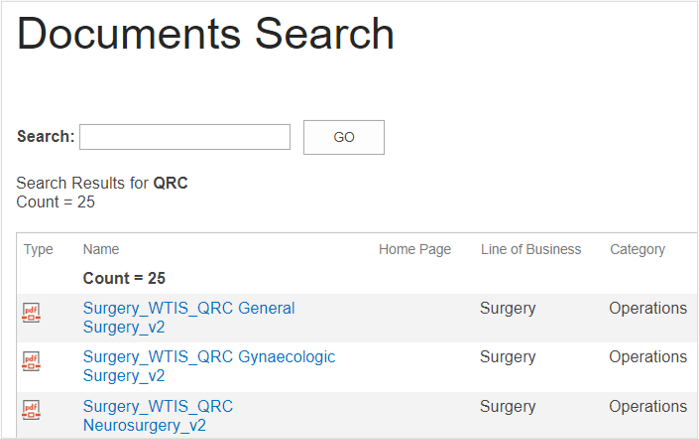
Note: The QRCs on the ATC Information Site have a more comprehensive description of the Priority Level, wait time targets, Service Details and include other information that is beneficial in capturing wait list entries accurately (for example DARTs, DARCs, System Delay, etc.). The PATs available on the WTIS site only include high level Priority Level descriptions for reference.
|
Download the PAT |
View and Print the PAT |
|
|